

Download Plex VR APK – Smartphone-Based VR Platform, 360-Degree Media, Virtual Viewing Environments, Voice Chat, Google Daydream Compatibility
Overview
Plex VR APK is a smartphone-based virtual reality platform designed to elevate media consumption through immersive 3D experiences. The software enables users to watch films, television shows, and other media files within a virtual environment, transforming passive viewing into an interactive and lifelike event. By integrating with virtual reality technology, Plex VR brings a new dimension to how users engage with digital content, offering a sense of realism previously unattainable with standard playback methods.
Targeted primarily at media enthusiasts and VR hobbyists, the application supports both 180-degree and 360-degree VR formats, allowing for full spatial immersion. Users can enjoy shared viewing sessions with up to four friends, fostering a social experience even when physically apart. The platform provides three distinct virtual environments as background settings, enhancing the sense of presence and personalization. Additionally, built-in voice chat facilitates real-time communication during playback, enriching collaborative viewing.
While the developer did not provide additional information about the company or its background, the application is positioned as a tool for users seeking a more engaging and interactive way to access their media libraries. It is designed for individuals who own compatible Android smartphones and the Google Daydream headset, indicating a niche but dedicated user base. The software is available for free download, making it accessible to early adopters of VR media technology.
Key Features & Capabilities
- Immersive 3D Viewing – Enables users to watch media in a fully immersive virtual environment, supporting 180-degree and 360-degree VR formats for maximum spatial engagement.
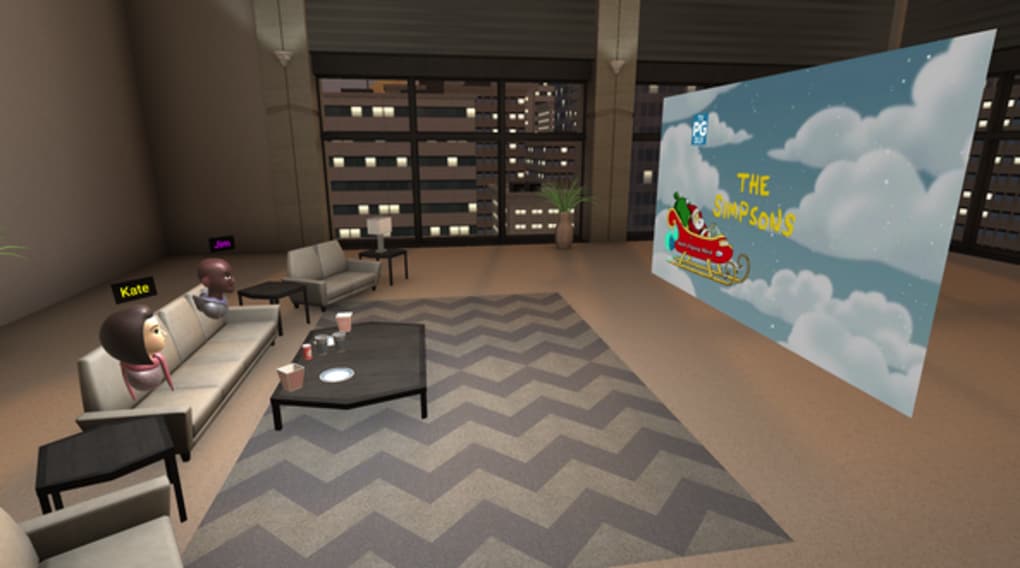
- Multi-User Shared Viewing – Allows up to four friends to join a single session, creating a social and collaborative watching experience despite physical distance.
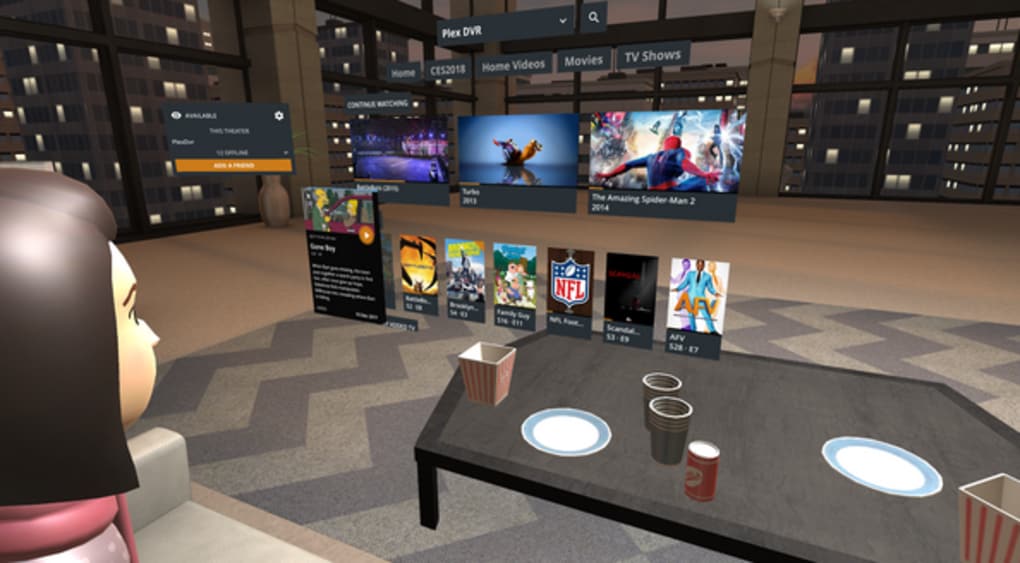
- Virtual Environment Selection – Offers three unique background settings, enabling users to customize their viewing space for a more personalized and engaging atmosphere.
- Integrated Voice Chat – Provides real-time audio communication during playback, enhancing interaction and conversation during shared sessions.
- Media Management Tools – Includes features such as saving, sharing, tagging, and organizing content, along with a menu that displays recently viewed and newly added files.
- Avatar Customization – Allows users to add a personal avatar to their virtual profile, contributing to a more expressive and individualized presence in the VR space.
These capabilities are ideal for users who want to transform their home entertainment setup into a cinematic VR theater. The ability to watch content in a virtual cinema, interact with friends, and personalize the environment makes Plex VR a compelling option for those invested in immersive media. The combination of social features and spatial media playback sets it apart from conventional streaming apps, particularly for users with access to compatible VR hardware.
User Interface, Workflow & Performance
The user interface of Plex VR APK is designed to be intuitive within the constraints of a VR environment. Navigation relies on head movements and touch-based controls from the Google Daydream controller, allowing users to browse media libraries, select content, and manage playback with minimal friction. The layout is structured around a central menu that displays recent activity and new additions, promoting ease of access to frequently used files.
Workflow efficiency is enhanced by the integration of quick-access tools such as tagging, saving, and sharing, which can be performed during or after playback. The interface supports voice commands through the integrated chat system, reducing the need for manual input. However, exact performance details were not specified, and resource usage behavior remains unconfirmed. The developer did not provide additional information about CPU or RAM usage, nor did they share benchmarks or stability reports.
Given its reliance on mobile VR hardware, performance is likely influenced by the underlying Android device and the Daydream headset’s processing capabilities. General software behavior patterns suggest that smooth operation depends on consistent frame rates and low latency, which are critical for VR applications. Users should expect a stable experience if their hardware meets the required standards, though no official confirmation of system stability was provided.
Compatibility & System Requirements
Plex VR APK is compatible with Android-powered smartphones and requires the Google Daydream headset for full functionality. The software is specifically designed for devices that support Daydream’s VR platform, which limits its accessibility to a subset of Android users. The installation size and hardware requirements were not listed, and the developer did not provide additional system specifications.
Exact system requirements were not listed, and compatibility information was partially provided. Users should ensure their smartphone supports the Google Daydream platform before attempting installation. The software is available as a downloadable APK file, which may require enabling installation from unknown sources on the device. This setup process is standard for Android VR applications but may pose a barrier for less tech-savvy users.
Pros and Cons
Pros
- Immersive 3D viewing experience with support for 180° and 360° VR formats
- Enables shared viewing with up to four friends in real time
- Offers three customizable virtual environments for personalization
- Includes integrated voice chat for social interaction during playback
- Provides media management tools such as tagging, saving, and sharing
- Free to download, making it accessible for early VR adopters
Cons
- Requires Google Daydream headset, limiting hardware compatibility
- Dependent on Android smartphones with Daydream support
- Installation via APK may be unfamiliar to non-technical users
- Exact performance and resource usage details were not specified
- Platform-specific limitations may hinder broader adoption
FAQ Section
Is Plex VR APK compatible with all Android phones?
Plex VR APK is compatible only with Android-powered smartphones that support the Google Daydream platform. Not all Android devices meet the hardware requirements for Daydream, so compatibility is limited to specific models.
Do I need a VR headset to use Plex VR?
Yes, the Google Daydream headset is required to experience the full virtual reality functionality of Plex VR. Without the headset, the application cannot deliver its intended immersive viewing experience.
Is Plex VR safe to download and use?
Plex VR APK is available for free download, but users should ensure the source is trustworthy. Installing APK files from unverified sources may pose security risks, so caution is advised.
Can I use Plex VR offline?
Yes, once the media files are stored locally on the device or connected to a Plex server, the application can function without an internet connection, allowing for offline viewing.
Does Plex VR support all video formats?
The software supports 180-degree and 360-degree VR video formats. Specific support for other media types was not detailed in the provided information.
Final Thoughts + CTA
Plex VR APK stands out as a unique desktop application that brings media consumption into the realm of virtual reality. Its focus on immersive viewing, social collaboration, and customizable environments makes it a compelling choice for users passionate about both entertainment and emerging VR technology. While its reliance on the Google Daydream headset restricts accessibility, the experience it delivers is unmatched in its niche.
For media enthusiasts with compatible hardware, Plex VR offers a next-generation way to enjoy films and TV shows. The combination of shared viewing, voice chat, and virtual settings creates a dynamic and engaging atmosphere. Though performance and system details are not fully disclosed, the application’s core features are well-aligned with its purpose.
Download Plex VR now and transform your media library into a virtual cinema experience.






.png)
